
AI-enabled lab analytics · vDesk/VDI

Better campus labs,
for less.

vDash turns lab, licence and asset usage data into actionable insights. vDesk and Turbo VDI deliver and maintain every lab PC.

Per-PC annual subscription · Free 2-week pilot · Built and supported in Malaysia
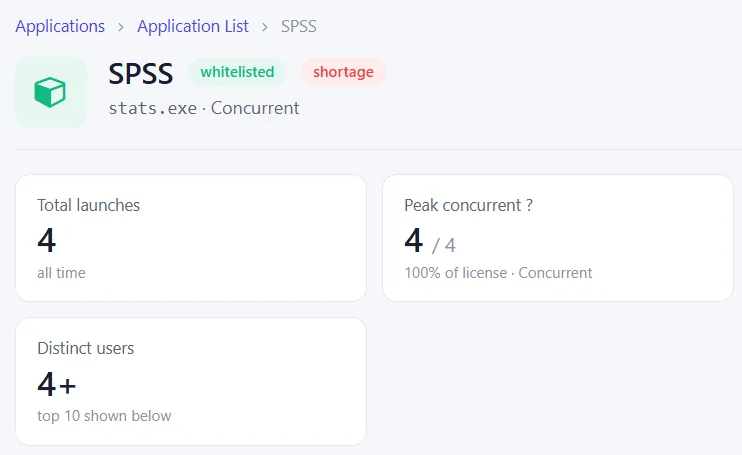
vDash SPSS application view showing peak concurrent use at 4 of 4 licences and a licence shortage flag

vDash application view: peak concurrent licence use (sample data, anonymised)
2 weeks

Free vDash pilot on your own lab PCs

Day 1

Live usage data once agents are installed

1 server

Manages every vDesk lab PC

~4 weeks

Typical Turbo VDI implementation

Two product lines, one goal

Measure with vDash. Deliver with vDesk/VDI.

Use real usage data to decide what your labs need, then keep every lab PC and application running.

Measure

vDash – AI-enabled lab, licence and asset analytics

A lightweight agent on every lab PC collects usage data. vDash turns it into actionable insights for IT and management.

  • Live status for every lab PC
  • Peak concurrent licence use, not installs
  • Usage heatmaps, asset and warranty expiry tracking
  • Scheduled PDF/PPTX reports

Deliver & maintain

vDesk/VDI – manage lab PCs and deliver lab apps

vDesk manages every lab PC from one server. Turbo VDI streams lab applications to any device, in a browser.

  • Golden images and restart-to-restore
  • Offline mode and exam mode
  • Turbo VDI: apps in isolated containers, HTML5 or RDP
  • Active Directory single sign-on

See it in vDash

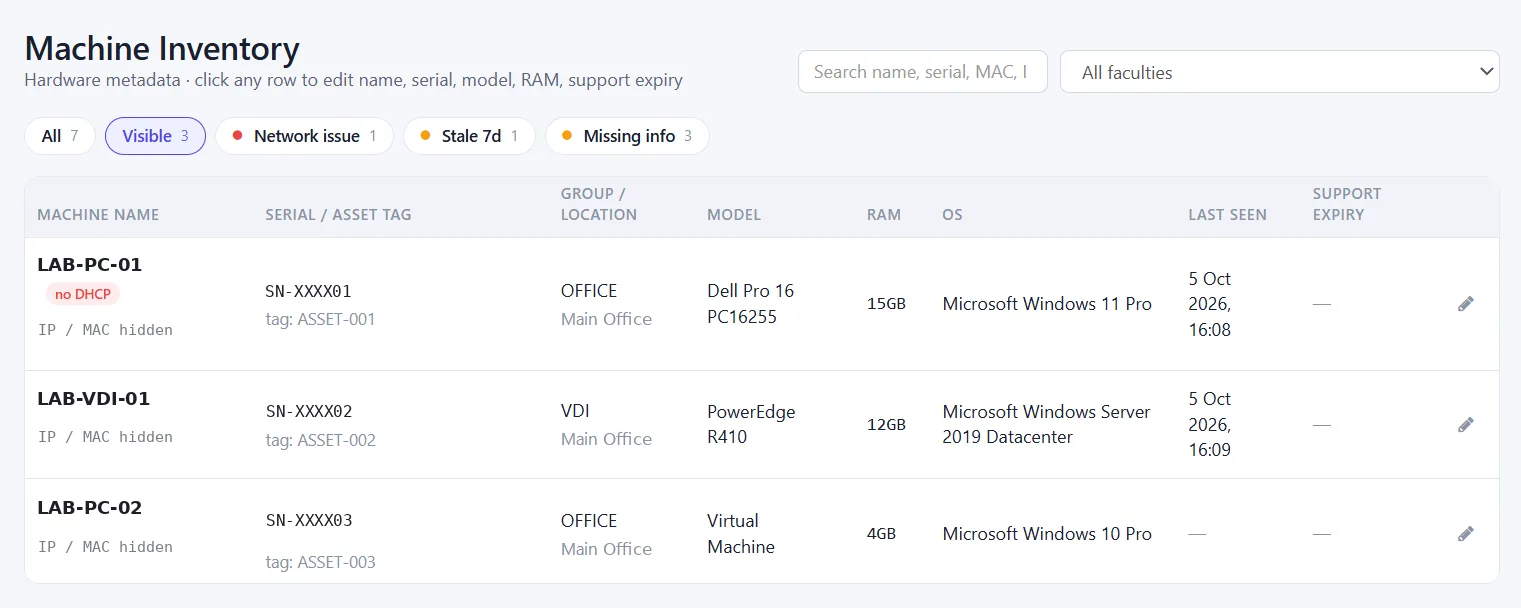
Every lab PC, licence and asset in one console

Spot stale, offline or incomplete PCs at a glance, and keep the asset register accurate without spreadsheets.

  • Filter by network issue, stale or missing info
  • Serial, model, RAM, OS and support expiry per PC
  • Active Directory integration, so reports show real names
vDash machine inventory listing lab PCs with serial and asset tags, location, model, RAM, operating system and last-seen time, with filters for network issues, stale and missing info

vDash machine inventory (sample data, anonymised)

How it works

Measure, decide, deliver, maintain

One loop, from usage data to well-run labs.

01

Measure

vDash collects usage from every lab PC.

02

Decide

IT and management act on the insights.

03

Deliver

Turbo VDI streams apps to any device.

04

Maintain

vDesk keeps every lab PC on a clean, current image.

Why CloudDesk

Built for campus IT teams

Concurrent use, not installs

Buy licences for real peak demand.

Active Directory integration

Reports show real names and groups.

Live by end of day one

Agents install in minutes.

Built and supported in Malaysia

Local design, deployment and support.

Get started

Start with a free 2-week vDash pilot

Or book a 30-minute vDesk/VDI demo. Per-PC annual subscription after the pilot.